Free Did You Try Icing It SVG PNG
$0.00
Free did you try icing it svg with two funny gingerbread characters. SVG & PNG files for Cricut, Silhouette, sublimation & print projects.
Pairs perfectly with
- Files delivered instantly after purchase
- All formats bundled in one ZIP
- Secure checkout
Description
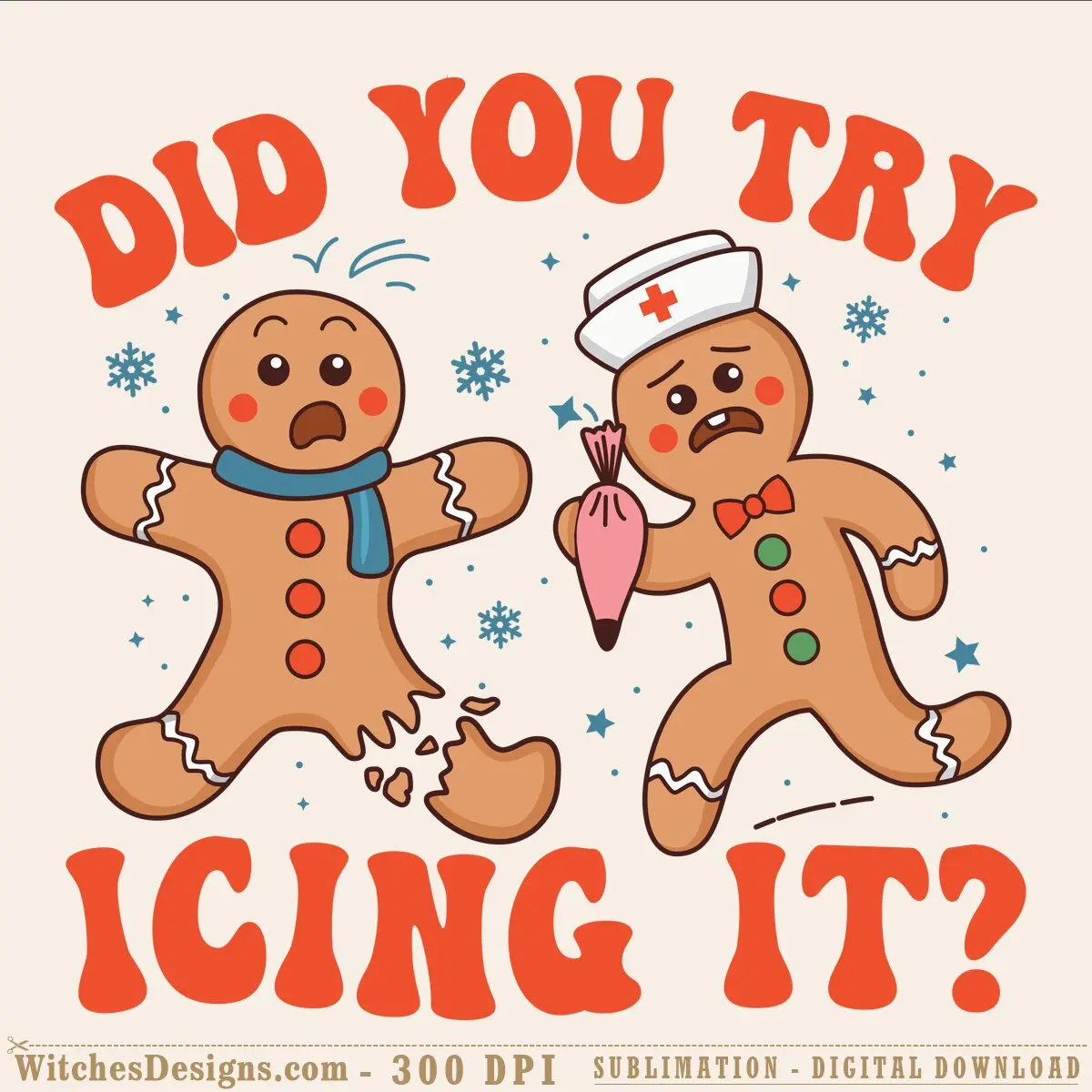
This free did you try icing it svg captures the hilarious panic of baking mishaps—two distressed gingerbread characters, one missing a chunk and the other wielding a piping bag like a surgeon. It’s the kind of design that makes bakers, holiday crafters, and anyone who’s ever faced a kitchen disaster laugh out loud.
Why crafters love this free did you try icing it svg
The playful, hand-drawn gingerbread figures with sad expressions and festive accessories (a nurse’s cap, a scarf, a piping bag full of pink frosting) feel instantly relatable. Snowflakes and stars surround the characters, keeping it festive without overdoing the holiday vibe. Bold red lettering frames the scene perfectly for print-and-cut projects or vinyl decals.
Perfect projects for this design
- Kitchen towels, aprons, and funny baking-themed t-shirts
- Tumblers and mugs for holiday gift exchanges
- Vinyl decals for baker’s car windows or craft room walls
- Sublimation blanks (mugs, drinkware, apparel)
- Greeting cards and paper crafts
- Screen print transfers for small batch POD orders
What’s included & technical details
You’re getting both SVG and PNG formats. The SVG features a single layer with 13 colors, making it simple to separate for vinyl cutting or print layers. The PNG arrives at 300 DPI (5734 × 5528 px) with a transparent background, ready for sublimation or DTF printing. Both formats load seamlessly into Cricut Design Space, Silhouette Studio, Adobe Illustrator, and CorelDRAW.
This is a free instant download—sign up for your account and grab it right away. If you love the vibe, browse our paid holiday and funny-saying collection for more laugh-out-loud designs.
Frequently asked questions
I'm brand new to Cricut—how would I turn this gingerbread svg into something I can actually wear?
Open the SVG in Cricut Design Space, scale it to fit a shirt front (usually 10–14 inches wide), then use the "Print Then Cut" feature to print the design onto inkjet transfer paper and heat-press it onto your blank tee. The transparent background and high resolution make registration super clean.
Can I sell products with this did you try icing it design on them for my small business?
Yes—the design is licensed for commercial use on sublimation blanks, print-on-demand items, and finished goods (mugs, shirts, tumblers, etc.). Just don't resell the SVG/PNG file itself or claim you designed it.
What if I want to change the gingerbread colors or remove the snowflakes?
The SVG is single-layer, so you can open it in Illustrator or Silhouette Studio and edit each color group independently—swap the tan cookie color to white, make the frosting details purple, whatever you want. The PNG is raster, so for color changes you'd need to use the SVG version.
Browse more Funny & Sarcastic designs.
Additional information
| Formats | SVG, PNG |
|---|---|
| Compatible software | Cricut Design Space, Silhouette Studio, Adobe Illustrator, CorelDRAW, Graphtec Studio |
| Resolution | 5734×5528 px @ 300 DPI |
| Print size | 19.11 x 18.43 inch |
| Colors | 13 |
| Background | Transparent |



Reviews
There are no reviews yet.