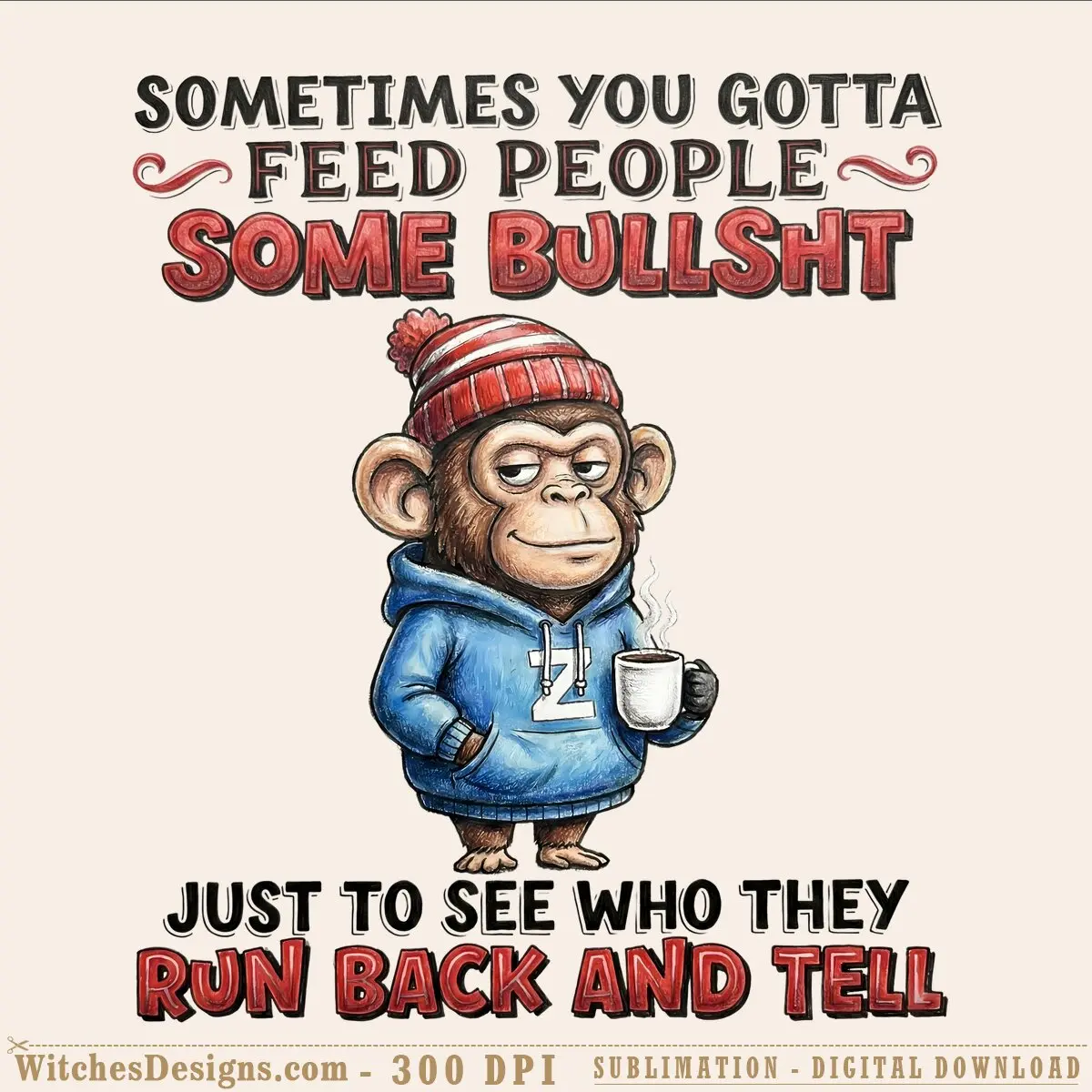
Monkey png sublimation clipart retro meme
$2.99
Monkey png sublimation clipart with sarcastic quote. High-res 4000x4000px, transparent background. Perfect for tumblers, DTF transfers, and print projects.
Pairs perfectly with
- Files delivered instantly after purchase
- All formats bundled in one ZIP
- Secure checkout
Description
This monkey png design captures a laid-back, hand-drawn retro vibe with just the right amount of attitude. A cozy chimp in a striped beanie and blue hoodie holds a steaming mug, paired with bold, distressed text that reads like a joke your friends would actually share. The warm, sketch-style illustration and bold typography give this piece that authentic vintage meme energy—the kind that feels right at home on tumblers, apparel, and sublimation projects.
Why this monkey png works for print sellers
The high-resolution 4000×4000 pixel file (300 DPI) keeps details crisp whether you’re scaling it down for a 15 oz tumbler wrap or printing it full-size on a tee. The transparent background means zero cleanup—drop it straight into your design, recolor as needed, and go. Works flawlessly in Cricut Design Space, Silhouette Studio, Adobe Illustrator, and CorelDRAW, so your workflow stays smooth no matter your software.
Perfect for sublimation and DTF projects
- Sublimation tumblers, mugs, and drinkware
- DTF apparel transfers (adult humor, funny gifts)
- Waterslide decal blanks and sticker sheets
- Print-then-cut stickers for POD storefronts
- Screen print mockups and digital clipart libraries
- Social media graphics and merchandise mockups
Pairs well with your humor collection
This monkey png design sits perfectly alongside other sarcastic, retro-styled graphics. Stack it with bold typography sets, coffee-themed designs, and vintage animal illustrations to build a full funny-gifts and sublimation lineup your customers will come back for.
Frequently asked questions
Can I use this monkey png file with my Cricut or Silhouette machine?
Yes—the 4000×4000 pixel transparent PNG imports seamlessly into Cricut Design Space and Silhouette Studio (Basic and Designer editions), plus it opens in Adobe Illustrator and CorelDRAW if you want to tweak colors before sublimation or DTF work.
How do I change the text color or customize the monkey png for my brand?
Since this is a high-res PNG, you can drop it into Photoshop or Canva to adjust hues, swap the background color, or overlay it on your own templates—perfect for matching your POD store's color palette or customer requests.
I'm new to sublimation—how would I actually print this monkey png on a tumbler?
Resize the file to fit your tumbler's wrap dimensions (usually around 8.5–10 inches tall), print it on sublimation paper with your printer, then press it onto a coated tumbler blank using a heat press at the right temperature and time for your blanks. The transparent background means the design sits perfectly without white borders.
Browse more Funny & Sarcastic designs.
Additional information
| Formats | PNG |
|---|---|
| Compatible software | Sublimation & DTF printing, Canva, Photoshop, Procreate, Cricut Print-then-Cut |
| Resolution | 4000×4000 px @ 300 DPI |
| Print size | 13.33 x 13.33 inch |
| Background | Transparent |

Reviews
There are no reviews yet.